Netlify Email: How to Set Up Mail on a Netlify DNS Domain

Netlify email in one line: Netlify can run DNS for your domain, but it doesn't provide email, so you choose a mail provider and add its records in Netlify's DNS panel. Receiving needs MX records. Sending reliably also needs SPF and DKIM. And if your nameservers aren't Netlify's, nothing you add there counts: the records go wherever your DNS actually lives, often the registrar.
Netlify's docs below were checked on 30 October 2026.
Does Netlify do email? No, it does DNS
Netlify's support guide doesn't hedge: "Netlify does not provide email services" (Netlify support guide: receiving email on your domain). Its instructions are written mainly for people on Netlify DNS, and it says any mail provider should work.
So the first question is who answers DNS for your domain:
dig NS yourdomain.com +short
Compare it with the four name servers in the zone's Name servers panel (Set up Netlify DNS). If they match, everything below happens in Netlify. If not, add the records wherever DNS answers. It's the same split on Vercel, covered in the Vercel domain email guide.
The catch: a Netlify DNS zone has to serve a site
This part is specific to Netlify. Its DNS records doc lets you host records for other services, such as your mail provider, "as long as you host at least one website with us that uses the domain".
So a domain that only does email, or whose site lives elsewhere, should keep its DNS at the registrar.
Assigning the domain to a site also creates Netlify's own NETLIFY records, two of them in the screenshot below for the root and www. Mail records sit beside them.
Choosing who handles the mail
Netlify's guide mentions Zoho Mail for full email and ImprovMX for forwarding. The real decision is which job you're filling:
| You want | Provider type | Covers |
|---|---|---|
| A mailbox for each person | Hosted suite, such as Zoho Mail | Receiving and replying, priced per user |
| Mail passed to an inbox you already read | Forwarder, such as ImprovMX | Receiving only |
| Your app's sign-up and receipt mail | Email API, such as Resend or Postmark | Sending from code |
Most Netlify projects end up with two of these on one domain, each with its own records.
Adding Netlify MX, SPF and DKIM records
Open DNS in the left sidebar, select the domain, click Add new record, fill in the form and save. The support guide reaches the same panel from the site: Domain management, then Production domains, then Go to DNS panel.
The form asks for:
- Record type: A, AAAA, CAA, CNAME, MX, NS, SPF, SRV or TXT.
- Name: relative to the domain. "@ will automatically set domain as the host name".
- Priority: MX only, where a "lower value means more preferred".
- Value: "The mail server's hostname", without
http://orhttps://. - TTL: optional. The support guide gives 3600 seconds as the default, and my saved records show 3600.
Here's a real set: the three records Mailyond asks for on updates.beyondfolder.com, a mail subdomain.
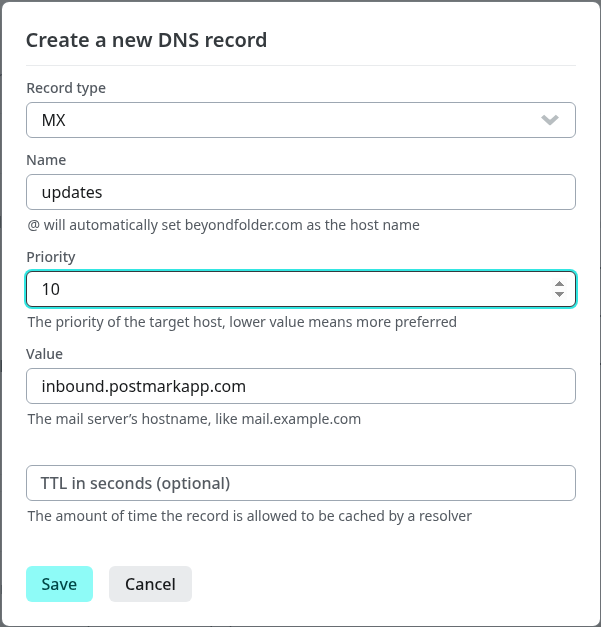
The MX going in, with the TTL left empty.
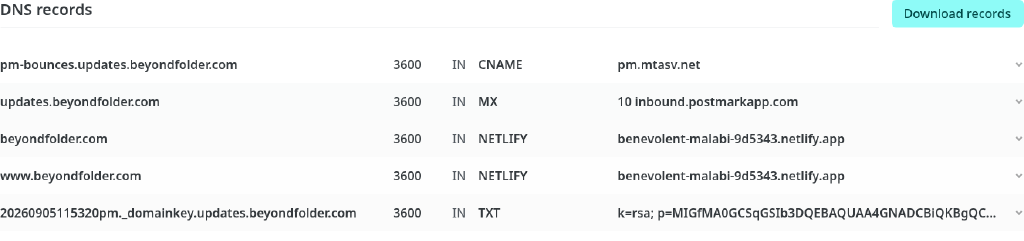
Saved next to the two NETLIFY records: CNAME pm-bounces.updates to pm.mtasv.net, MX updates to inbound.postmarkapp.com at priority 10, and TXT 20260905115320pm._domainkey.updates holding the DKIM key (k=rsa; p=MIGfMA0...).
Three things to watch:
- Type the prefix only. The list shows full names, but the Name field wants
updates, notupdates.beyondfolder.com. - SPF goes in a TXT record. The SPF type is deprecated; Netlify says to "use a TXT record instead".
- Check long TXT values. The doc lists TXT as "up to 255 characters". This 1024-bit DKIM key fits. With a longer key, confirm the saved value matches your provider's.
There's no in-place edit: add a record with the new value, then delete the old one. Changes can take "up to a few hours" to propagate.
An honest note on these screenshots: beyondfolder.com doesn't run on Netlify DNS. I added it to a free Netlify team with a placeholder site to show the panel, but its live DNS stays on Cloudflare (nameservers emily.ns.cloudflare.com and lloyd.ns.cloudflare.com, checked 30 October 2026). No resolver asks Netlify about this domain, so those records route no mail, however correct. Records only work in the authoritative zone, which is why dig NS comes first.
Netlify email forwarding
Netlify doesn't forward mail, so forwarding means a third-party forwarder such as ImprovMX, the one its guide names. Add the forwarder's MX records and SPF TXT in Netlify DNS, then set the destination in its dashboard.
Forwarding only receives. Reply to a forwarded message and the answer leaves from your personal address unless you add a sender for the domain. Where forwarders stop is covered in email forwarding service.
Netlify Forms notifications, which email you each form submission, aren't an inbox either and don't make the domain receive mail.
Sending from your Netlify site or functions
There's no Netlify mail service for your code either, so a sign-up flow calls an email API from a Netlify Function. The sender's records (DKIM, often a bounce record, sometimes SPF) go in the same zone, named exactly as the provider shows them.
A second sender's SPF on the same name gets merged into one v=spf1 TXT record: two SPF records on one name make SPF fail.
Several Netlify sites on separate domains means repeating this per domain, and email API plans tend to cap or price by domain count (transactional email for multiple domains).
Email stopped working after moving to Netlify DNS
Netlify's Set up Netlify DNS doc warns you to copy existing records, "such as MX records for email service", into Netlify DNS before changing nameservers. Skip it and your MX records stay behind at the old host: your mail provider still runs, but nobody can find it.
In this forum thread, Netlify support traced a user's broken Zoho mail to that move, and adding the three Zoho MX records in Netlify DNS fixed it.
The fix:
- Collect the old values from your previous DNS host or mail provider.
- Re-add every MX, the SPF and DKIM TXT records, and
_dmarcif you had one (DMARC is now RFC 9989). - Wait: up to a few hours for records, up to a day for nameservers.
- Test from another domain's account, and check spam.
Before switching, export or screenshot the old zone. The MX record checker shows what the internet currently sees.
Where Mailyond fits
Honest first: if every person on your team needs a full mailbox of their own, a hosted suite like Zoho Mail or Google Workspace is the right call.
The other common shape is a site whose addresses people write to, plus an app that sends mail: usually one vendor for each. Mailyond covers both from one 5-minute DNS setup with 3 records, the ones above: a DKIM TXT, a Return-Path CNAME and an MX. Mail to any address on the domain arrives in one inbox next to your other domains, you reply as the address it was sent to, and your functions send through a Resend-compatible API from the same domain.
It works on a subdomain, which is what updates is, so an apex already on Zoho or Workspace stays put (email on a subdomain). Pricing runs from $10/month: Basic is $10 for up to 5 domains, Pro $20 for up to 10 and Agency $40 for up to 30, with a 7-day free trial on Basic and Pro. Connect your first domain.
FAQ
Does Netlify provide email hosting?
No. Netlify's support guide says it "does not provide email services". It can host your DNS, where you add a mail provider's records.
Why did my email stop after moving to Netlify DNS?
The nameserver switch left your MX records at the previous DNS host. Add your provider's MX, SPF and DKIM records in Netlify DNS and allow up to a few hours.
Can I use Netlify DNS just for email?
No. Netlify hosts records for other services only if at least one website on Netlify uses the domain. Keep a mail-only domain's DNS at your registrar.
Can I forward email on a Netlify domain?
Yes, through a third-party forwarder such as ImprovMX, with its MX and SPF records in Netlify DNS. Forwarding only receives.
Are Netlify Forms notifications an inbox?
No. They email you your site's form submissions; they don't let the domain receive mail.
Send and answer email across all your domains
Every address on every domain in one inbox, plus a Resend-compatible API for your app's email.
- One DNS setup per domain
- Verify in about five minutes
- Price
- Starting from $10 / month
- Replies on the same domain
- Answer from the address they wrote to
Namecheap Email Setup: The Three Options and Their Catch
Namecheap email setup, step by step: free forwarding, Private Email, or a third-party host. The DNS records each needs, what they cost, and where each breaks.
No Reply Email: Keep Resend, Postmark or SES and Get Replies
Sending from noreply@? Keep Resend, Postmark or SES for sending and get replies on the same domain in one inbox, for every domain you run, at a flat price.