No Reply Email: Keep Resend, Postmark or SES and Get Replies

A no reply email is a noreply@ sender that nobody reads. Customers reply to it anyway, so the reply bounces or disappears. You don't have to change senders to fix it. Keep Resend, Postmark or SES for sending, set a Reply-To (or the From) on a name whose MX points at a real inbox, and read every reply there. With Mailyond that's one 5-minute DNS setup with 3 records per domain, and replies for all your domains land in one inbox from $10 a month.
Vendor docs and prices below were checked on 27 October 2026.
What a no reply email is, and why it costs you
What is a no reply email? It's the From address on mail your app sends by itself (sign-ups, receipts, password resets), where nobody receives what comes back. Often it's literally noreply@example.com, sometimes a normal looking address on a subdomain with no MX.
People reply anyway. Someone gets a receipt with the wrong amount and hits reply. With no inbox behind the address the reply bounces, and with a catch-all nobody checks it just sits there. Either way the customer wrote to you and nothing happened.
Some then mark your next email as spam, and every complaint counts against your sending domain. The marketing case against a do not reply email (worse engagement) is real too, but you've probably read that one.
How to create a noreply email is the easy part: any send API puts any address on a verified domain in From. Getting the replies to a person is the part worth doing.
How to get replies on a domain that only sends
Here's how to reply to email on a domain that only uses Resend for sending, or Postmark, or SES. It's the same 3 steps:
- Pick a reply name, like
hello@example.comorhello@updates.example.com. - Give that name an MX record that points at an inbox.
- Set
Reply-Toto that address in your send call, or send From it directly.
If the apex already runs Google Workspace or another mailbox, put the reply name on a subdomain so that MX stays untouched (email on a subdomain walks through it).
The rule that catches people: the reply name can't be your sender's bounce subdomain. Every send API puts records on a name for bounces, and on SES and many Resend domains that includes an MX. So the name looks like it receives mail, when all it accepts is bounces for the vendor.
| Sender | Bounce name it uses | Where replies should go |
|---|---|---|
| Resend | send.example.com, the default Return-Path (docs) | Your From domain, if its MX points at an inbox, or another name with an inbox MX, never send. |
| Postmark | pm-bounces.example.com, a CNAME to pm.mtasv.net | Any name with an inbox MX |
| Amazon SES | Your custom MAIL FROM subdomain, with MX 10 feedback-smtp.<region>.amazonses.com | Any name other than the MAIL FROM subdomain |
AWS is explicit about SES: the MAIL FROM domain "shouldn't be a subdomain that you use to receive email", and you "must publish exactly one MX record" to it (SES custom MAIL FROM).
What each send API gives you for replies (and what it doesn't)
All three receive mail, as something for your code to handle.
Resend receives on every plan. You add an MX, an email.received webhook tells your app, and your code fetches the body. Replying in the same thread is your code's job too (Reply to Receiving Emails). The full Resend path is in where Resend replies go.
Postmark has inbound processing on Pro ($16.50 a month) and Platform ($18), not on Basic ($15) (pricing). For inbound domain forwarding you point an MX at inbound.postmarkapp.com with priority 10, and Postmark typically recommends a subdomain for it. Each message reaches your webhook as JSON (Inbound domain forwarding). Postmark also says inbound domains "are unique across Postmark", so a name feeds one inbound setup. If your reply name is already an Inbound Domain on your own Postmark server, pick another name or remove it there first.
Amazon SES receives only in the Regions that support receiving. The MX is 10 inbound-smtp.<region>.amazonaws.com, and receipt rules deliver each message to S3, SNS or Lambda (SES MX for receiving, Email receiving). AWS says the endpoints "aren't IMAP or POP3 email servers", so reading the mail is up to you.
So all three hand inbound mail to your code. If a person should read and answer replies, you either build that UI or point the reply name at an inbox. The common shortcut, forwarding replies into Gmail and answering with Send-as, usually fails DMARC (how to reply to email from a custom domain explains why).
One inbox for replies across your send-API domains: keep your sender, add the reply side
Pointing the reply name at an inbox doesn't touch your sending. These are the three records I added to beyondfolder.com so updates.beyondfolder.com receives in Mailyond (DKIM key cut short):
TXT    20260905115320pm._domainkey.updates   k=rsa; p=MIGfMA0G...IDAQAB
CNAME  pm-bounces.updates                    pm.mtasv.net
MX     updates                               inbound.postmarkapp.com (priority 10)
None of them sit on a name your sender already uses:
- Resend's DKIM is at
resend._domainkeyand its bounce records onsend.. SES uses its own_domainkeyCNAMEs and the MAIL FROM subdomain. - The Mailyond DKIM selector has its own timestamp, so it won't collide with another selector.
- There's no SPF TXT to add: the Return-Path CNAME covers it, so there's no second
v=spf1to merge. - A Postmark sender may already have
pm-bouncespointing atpm.mtasv.neton that name. Same value, so it stays.
On the sending side it's one field. Leave From as it is and add the reply address:
// Resend Node SDK, emails.send()
replyTo: 'hello@updates.example.com'

// Postmark API, POST /email
"ReplyTo": "hello@updates.example.com"

// Amazon SES v2 SendEmail (an array)
ReplyToAddresses: ['hello@updates.example.com']
Or drop noreply@ and send From the reply address, so replies come straight back to it.
Where Mailyond fits
I built Mailyond for app email and its replies on the same domains, at a flat price. Every address on every connected domain lands in one inbox, tagged by domain, and you answer from the address the customer wrote to, in the same thread. Your app keeps its sender. Optionally, Mailyond also has a Resend-compatible API (baseUrl: 'https://mailyond.com/api/external' with a myond_ key).
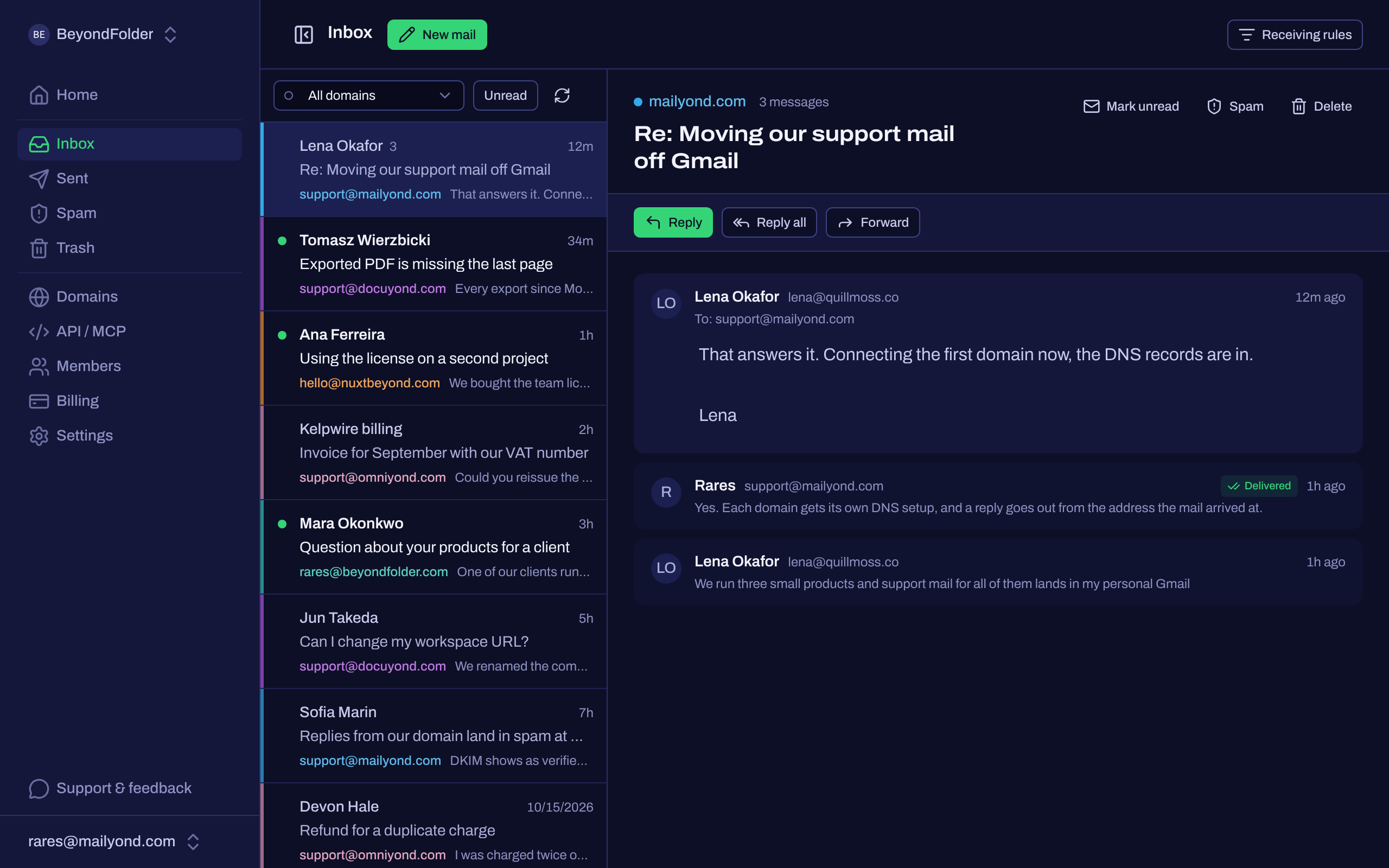
Mailyond inbox (product screenshot).
Basic is $10 a month for up to 5 domains (1 member). Pro is $20 for up to 10 domains and up to 3 members, Agency is $40 for up to 30 domains and up to 10 members. Addresses are unlimited, so there are no per-inbox or per-mailbox fees. Received mail counts toward the monthly allowance with sent mail (5,000, 10,000 or 25,000). Basic and Pro come with a 7-day free trial. What each send API costs across several domains is in transactional email for multiple domains.
Before you connect anything:
- A reply to mail your sender sent starts a new conversation in Mailyond, because Mailyond threads by matching
In-Reply-ToandReferencesagainst its own sends. Once you answer from Mailyond, later replies thread normally. - With one domain and a couple of addresses, your sender's own inbound may be enough.
- There's no IMAP. You read and answer in the web dashboard, or through the inbox API and the MCP server.
Try it on one domain, free for 7 days.
Test it before you ship
- Send from your app to a personal Gmail address, with the new Reply-To set.
- Reply from Gmail and check that the reply arrives in the inbox.
- Paste the reply name into the MX record checker to see where its mail goes, and run the domain through the DMARC checker for its SPF and DMARC records.
Give DNS up to 72 hours before you call it broken. SES's own docs allow for "a delay of up to 72 hours before Amazon SES detects the MX record" on a MAIL FROM domain.
FAQ
What is a no reply email?
An address like noreply@example.com that sends automated mail (receipts, sign-ups, password resets) with nobody reading what comes back. Replies to it bounce or go unread.
Is it bad to use a noreply email address?
Mostly, yes. People reply anyway and get a bounce or silence. Keeping noreply@ in From is fine if you set a Reply-To on an address with a real inbox.
How do I reply to email on a domain that only uses Resend for sending?
Keep Resend for sending and set replyTo to an address whose MX points at an inbox, never on Resend's send. subdomain. Our post on where Resend replies go has the details.
Can Postmark or Amazon SES receive replies?
Yes. Postmark inbound is on its Pro and Platform plans and posts JSON to your webhook. SES receives in supported Regions and delivers to S3, SNS or Lambda. Both hand the mail to your code.
Can several people read and answer the replies from my send-API domains?
Yes. In Mailyond, Pro lets up to 3 members into the same workspace and Agency up to 10. Basic is 1 member.
Do I have to stop using Resend, Postmark or SES?
No. Keep your sender for app mail and point only the reply name's MX at an inbox. Your send code changes by one field.
Send and answer email across all your domains
Every address on every domain in one inbox, plus a Resend-compatible API for your app's email. From $10 a month for 5 domains, $20 for 10 or $40 for 30, with a 7-day free trial.
- One DNS setup per domain
- Verify in about five minutes
- Flat monthly price
- $10 for 5 domains, $20 for 10, $40 for 30
- Replies on the same domain
- Answer from the address they wrote to
Namecheap Email Setup: The Three Options and Their Catch
Namecheap email setup, step by step: free forwarding, Private Email, or a third-party host. The DNS records each needs, what they cost, and where each breaks.
One Inbox for Multiple Domains: Stop Juggling Mailboxes
Why one inbox for multiple domains is harder than it sounds, the five approaches people try, and how to read and reply as every domain in one place.