
Email on a Subdomain: Subdomain Email Without Moving Gmail

Yes, you can run email on a subdomain. MX records are looked up per hostname, so an MX record for the subdomain sends mail for updates.yourdomain.com somewhere new while you@yourdomain.com keeps the MX it has today. Subdomain email is how you add a hello@ address, or an address for your app's email, without touching the inbox that already works. The trade-off is worth saying first: the address becomes hello@updates.yourdomain.com, and that longer name is what your customers will see and type.
I run this setup on my own company domain, so below are the real records, how DMARC treats the subdomain, and the DNS conflict that catches most people.
How email on a subdomain works
When someone sends to hello@updates.yourdomain.com, their mail server asks DNS for the MX records of updates.yourdomain.com. It never looks at the MX records of yourdomain.com. Every hostname gets its own answer, and that's the whole trick: Gmail or Google Workspace keeps the apex MX, and the subdomain points wherever you want. If your app sends with Resend from a subdomain, that's also where its replies go (where Resend replies go).
One detail from the spec is worth knowing. If a hostname has no MX at all, the sending server falls back to its A or AAAA record and tries to deliver there (RFC 5321, section 5.1, the "implicit MX" rule). So a subdomain that only hosts a website can still get delivery attempts aimed at your web server. Once you add a real MX, mail goes to the MX and the A record is left alone.
What we run on beyondfolder.com
My company domain, beyondfolder.com, receives mail through Cloudflare Email Routing, which forwards it to an inbox I already read. Email Routing only receives, so on its own it can't send a reply as the domain (I covered why, and the fixes, here). I didn't want to touch that MX, so I connected updates.beyondfolder.com to Mailyond instead. Both run side by side.
This is what DNS returned for both, queried over DNS over HTTPS (Cloudflare's 1.1.1.1) on 2026-10-16, with the DMARC report address redacted:
beyondfolder.com.                    300 IN MX 3 route1.mx.cloudflare.net.
beyondfolder.com.                    300 IN MX 72 route2.mx.cloudflare.net.
beyondfolder.com.                    300 IN MX 93 route3.mx.cloudflare.net.
updates.beyondfolder.com.            300 IN MX 10 inbound.postmarkapp.com.
pm-bounces.updates.beyondfolder.com. 300 IN CNAME pm.mtasv.net.
_dmarc.beyondfolder.com.             300 IN TXT "v=DMARC1; p=none; rua=mailto:[redacted]@dmarc-reports.cloudflare.net"

_dmarc.updates.beyondfolder.com: no record
The apex has its three Cloudflare MX records. The subdomain has its own MX pointing at Postmark (which delivers Mailyond's mail) and a Return-Path CNAME. Neither set of records knows the other exists. There's no DMARC record at _dmarc.updates.beyondfolder.com, so the subdomain falls back to the apex record, which matters more than it looks (more on that below).
These are our live records for updates.beyondfolder.com:
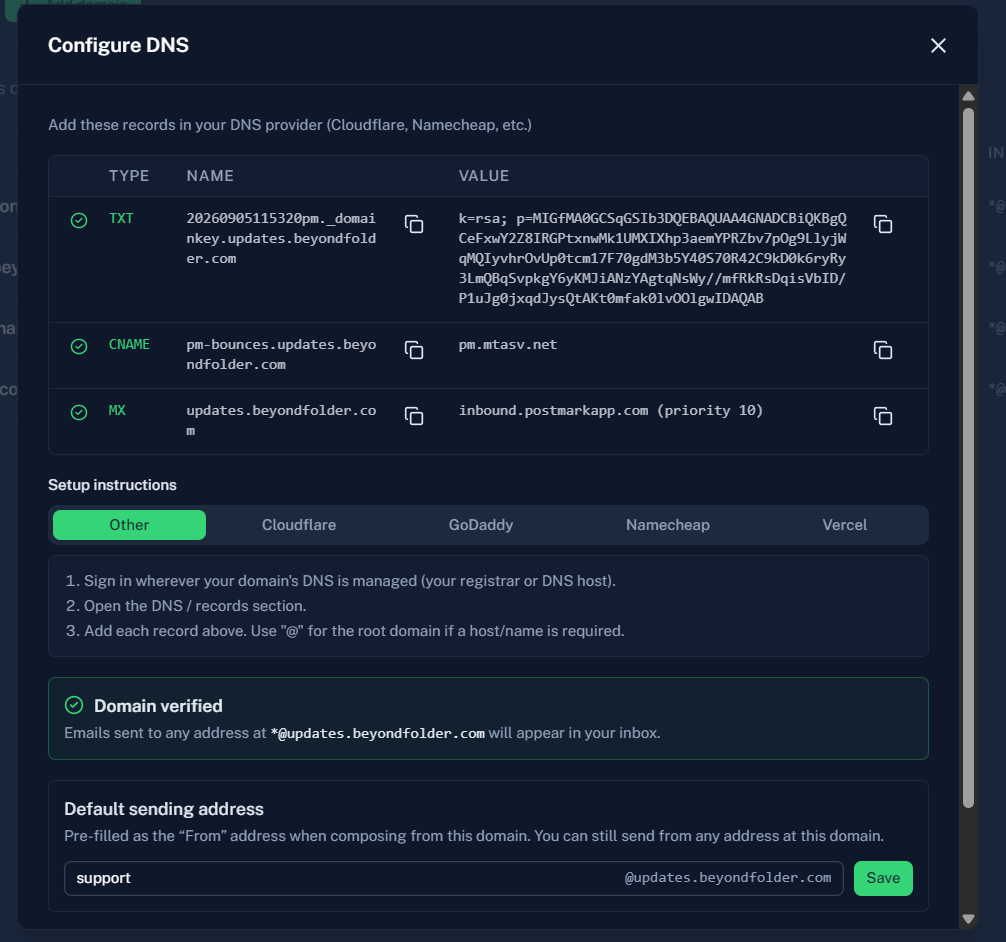
The three records for subdomain email
Connecting updates.yourdomain.com to Mailyond means adding three records. The dashboard shows the exact values for your domain, but they always have this shape:
| Type | Name | Value |
|---|---|---|
| TXT | <selector>pm._domainkey.updates.yourdomain.com | your DKIM public key |
| CNAME | pm-bounces.updates.yourdomain.com | pm.mtasv.net |
| MX | updates.yourdomain.com | inbound.postmarkapp.com, priority 10 |
The TXT record is DKIM, the key receivers use to check your signature. The CNAME is the Return-Path, the bounce address stamped on every message, and pm-bounces pointing at pm.mtasv.net is Postmark's default (Postmark's Return-Path guide). The MX is what makes mail to the subdomain arrive.
The mistake that's specific to subdomains happens in the Name field. Panels like Cloudflare take the name relative to your zone, so you type updates, pm-bounces.updates and <selector>pm._domainkey.updates. If you paste the full name into a panel that appends the zone itself, you get updates.yourdomain.com.yourdomain.com, and the record looks saved but never verifies. When one of the three stays pending, check that first. In Cloudflare, also leave the CNAME on DNS only (grey cloud).
MX record for a subdomain: the CNAME conflict
An MX record for a subdomain can't go on a name that already has a CNAME. Say updates.yourdomain.com already points at your changelog or status page host with a CNAME. The DNS spec says a CNAME can't share its name with any other data (RFC 1034, section 3.6.2), so the MX can't be added at that name while the CNAME is there.
There are two ways out: pick a different label for mail, like mail., inbound. or hello., or move the website to another name. The first is nearly always less work. It's also why Mailyond's Add Domain dialog uses inbound.yourdomain.com as its subdomain example, since inbound. is rarely taken by anything else.
The other two records live one level deeper (pm-bounces.updates and <selector>pm._domainkey.updates), so a CNAME on updates itself doesn't block them. Only the MX collides.
SPF, DKIM and DMARC on a subdomain
SPF and DKIM are checked per hostname, so the SPF TXT on your apex does nothing for mail sent as the subdomain. With Mailyond you don't add an SPF record on updates. at all. Receivers check SPF against the Return-Path host, pm-bounces.updates.yourdomain.com, and that name is a CNAME to Postmark, which publishes the SPF behind it.
DKIM signs as d=updates.yourdomain.com, the same domain as the From address, so it aligns for DMARC even under strict DKIM alignment (adkim=s). SPF alignment is the weaker side. The Return-Path is a deeper subdomain than the From, which passes relaxed alignment and fails strict. If your apex record has aspf=s, SPF never aligns and DMARC rests on DKIM alone. That's fine while DKIM verifies, but it's good to know before you go debugging a failed report. (Alignment is also what breaks replying as your domain through Gmail Send-as, which I wrote up in how to reply from a custom domain.)
DMARC is where subdomains surprise people. The current standard is RFC 9989, which replaced RFC 7489. Section 4.7 defines the record's tags, and section 4.10.1 describes the lookup. The receiver first asks for _dmarc.updates.yourdomain.com. If nothing is there, it walks up the DNS tree to your organizational domain and uses _dmarc.yourdomain.com. For a subdomain that exists, the policy then comes from that record's sp= tag, or from p= when there is no sp=.
RFC 9989 also makes np= part of the main DMARC standard (it came over from RFC 9091, which 9989 also replaces). np= sets the policy for subdomains that don't exist in DNS at all, like a made-up name someone invents to spoof you. Your updates subdomain has an MX, so it exists, and np= never applies to it.
The practical warning: if your apex is at p=reject with no sp=, the new subdomain is at reject from its very first message. Get DKIM verified before you send anything from it. For comparison, when I captured the records above on 2026-10-16, beyondfolder.com was on p=none with no sp=, so updates.beyondfolder.com inherited monitoring only. As of 2026-10-18 the apex is on p=quarantine, still with no sp=, so the subdomain now inherits quarantine, and receivers are asked to treat mail from it that fails DMARC as suspicious, which usually means the spam folder.
Check it in one paste
The DMARC checker takes up to 10 domains at once, so paste yourdomain.com and updates.yourdomain.com together, one per line. For a subdomain with no record of its own, it tells you it inherits the one at _dmarc.yourdomain.com and which tag applies (sp= or p=). It also flags aspf=s on the apex, since that's the setting that takes SPF out of the picture for a Postmark Return-Path. To confirm the subdomain's own MX, paste the same two names into the MX record checker: the apex should still show your current provider, and the subdomain should show inbound.postmarkapp.com.
When a subdomain is the wrong call
People type hello@yourdomain.com from memory. A longer address gets mistyped more, and I think hello@updates.yourdomain.com reads a bit less familiar to a customer who's never seen it before.
If your apex receives no mail today, skip the subdomain and connect the apex directly. You get the short address and there's nothing to protect. A subdomain makes sense when the apex already has a mailbox you don't want to risk, like a Workspace account with years of mail in it, or a forwarding setup you rely on.
Where Mailyond fits
A subdomain is the way I'd suggest anyone try Mailyond, because your current inbox doesn't change at all. You connect updates.yourdomain.com with one 5-minute DNS setup with 3 records, the apex MX stays exactly where it is, and mail to the subdomain lands in Mailyond. Replies go out from the address the customer wrote to, signed with the subdomain's own DKIM key, and your app can send from the same subdomain through the REST API with an API key. If it doesn't work out, you delete three records and you're back to what you had.
A connected subdomain counts as one domain on your plan. Basic is $10 a month for up to 5 domains and Agency is $40 for up to 30, and the mail you receive counts toward the monthly email allowance along with what you send. If you run a few products, each one can get its own subdomain, and they all end up in one inbox for every domain. Basic comes with a 7-day free trial: connect your first subdomain.
FAQ
Can a subdomain have its own MX record?
Yes. MX records belong to a hostname, so updates.yourdomain.com can have its own MX whatever the apex uses. The one thing that blocks it is an existing CNAME on the same name.
Does email on a subdomain hurt deliverability?
Only if the authentication is broken. With DKIM verified and DMARC aligned, mail from the subdomain passes the same checks as mail from the apex. It does start as a name receivers haven't seen before, so the first sends carry less history than an apex you've used for years.
Do I need a separate DMARC record for the subdomain?
No. Without one, receivers use the apex record, its sp= tag if set and p= otherwise (RFC 9989, section 4.10.1). Add _dmarc.updates.yourdomain.com only if you want a different policy or separate reports for the subdomain.
Will adding an MX on a subdomain break my Google Workspace mail?
No. Workspace's MX records sit on the apex, and the subdomain's MX is a separate name, so you@yourdomain.com keeps arriving in Workspace as before. If you're deciding whether each project needs a Workspace seat at all, I compared the options for email across several domains.
Your app's email and its replies, on every domain you own
Mailyond sends your app's email and receives the replies on the same domain, so you answer from the address people wrote to. A flat $10 a month for 5 domains or $40 for 30, with a 7-day free trial.
Email Hosting for Multiple Domains Without Per-Seat Fees
Email hosting for multiple domains usually bills per user per domain. Here are the real options, their costs, and how to run every domain from one inbox.
Gmail Send As Alternative: What to Use Before January 2027
Google is removing Gmail Send As for third-party addresses in January 2027. The real Gmail Send As alternatives, what each costs, and what is not changing.