Vercel Email: How to Get Mail Working on a Vercel Domain

Vercel email in one line: Vercel runs DNS for your domain, but it doesn't host mailboxes or send mail, so you pick an email provider and add its records on the domain's DNS page in Vercel. Receiving needs MX records. Sending reliably needs SPF and DKIM as well. And if your nameservers aren't Vercel's, records added in Vercel do nothing: add them wherever your DNS actually lives.
Vercel's docs and changelog below were checked on 25 October 2026.
Does Vercel do email? No, it does DNS
Vercel's guide is direct: "Vercel manages DNS for your domain but doesn't host mailboxes or send and receive email" (Vercel KB: set up email with your Vercel domain). That holds whether you bought the domain on Vercel or pointed its nameservers there. The DNS records docs say the same: "Vercel does not provide an email service".
What Vercel gives you is the zone, and its records only count if Vercel is authoritative for the domain. Adding a domain to a Vercel project doesn't change its DNS or email either. To see who actually answers for your domain:
dig NS yourdomain.com +short
If that returns Vercel's nameservers, everything below happens in Vercel. If it's Cloudflare, your registrar or anyone else, add the records there instead.
The two halves, and why it's usually two vendors
Email on a domain is two jobs: receiving what people send to hello@, and sending, whether that's a person writing back or your app sending sign-up mail. Vercel's guide sorts providers into three types:
| What you need | Provider type | Examples from Vercel's guide |
|---|---|---|
| Mailboxes people read and send from | Hosted email suite | Google Workspace, Zoho Mail, Fastmail |
| Mail passed on to an inbox you already have | Forwarding | ImprovMX, Forward Email |
| Your app's sign-up, reset and receipt mail | Email API | Resend, SendGrid, Postmark |
A hosted suite covers both halves for people, priced per user. Otherwise you get the default Vercel stack: a forwarder or mailbox to receive, plus an email API for the app. Two vendors, two setups, one domain.
DNS presets: the fast path for some providers
For some providers you don't type records at all. Open Domains, select the domain and use the Add DNS Preset dropdown. Per Vercel's changelog from 5 August 2026, presets exist for Google Workspace, Outlook, iCloud, Proton Mail, Zoho, Mailgun and ImprovMX (plus a Bluesky handle preset, which isn't email). You still finish verification in the provider's own dashboard.
One Google detail from the KB: new Workspace setups use a single smtp.google.com MX, while domains set up before 2023 may use the legacy five ASPMX records. Both work. Mixing them causes routing problems, so use one set, never both.
If you want full Google Workspace mailboxes for each person on the team, that's the honest answer to this whole page: use the Workspace preset and you're done.
Adding Vercel domain email records by hand
Without a preset, records go in through Add record on the domain's page:
- Name: empty for the root, or only the subdomain prefix for anything below it.
- Type: MX, TXT, CNAME and so on.
- Value: whatever the provider gives you.
- TTL: defaults to 60 seconds.
- Priority: MX only. Lower numbers are tried first.
Here's a real set: the three records Mailyond needs for updates.beyondfolder.com, a subdomain I use for mail.
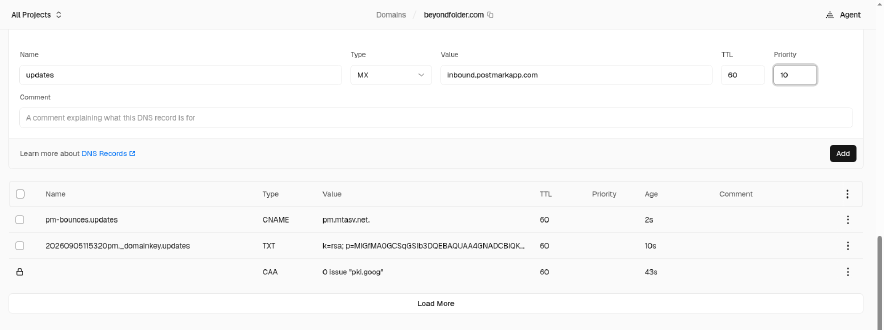
The MX going in: Name updates, Value inbound.postmarkapp.com, priority 10, TTL 60. Below it sit the Return-Path CNAME, the DKIM TXT and Vercel's default CAA record.

All three saved: MX updates to inbound.postmarkapp.com at priority 10, CNAME pm-bounces.updates to pm.mtasv.net, and TXT 20260905115320pm._domainkey.updates holding the DKIM key (k=rsa; p=MIGfMA0...).
Note the Name column: updates, not updates.beyondfolder.com. Vercel's docs: "For email on a subdomain, enter only that subdomain's prefix." Typing the full hostname there is the most common mistake in Vercel's panel.
An honest note on these screenshots: beyondfolder.com doesn't run on Vercel DNS. I added it to a Vercel team to show the panel, but its live DNS stays on Cloudflare (nameservers emily.ns.cloudflare.com and lloyd.ns.cloudflare.com, checked 25 October 2026), so Vercel's copy answers nothing. That's the lesson: records in a zone that isn't authoritative do nothing, however correct they look, which is why the dig NS check comes first.
Vercel email forwarding
Vercel has no forwarding of its own: its docs say it provides no email service, and as of 25 October 2026 no changelog entry adds one. Vercel email forwarding in practice means a third-party forwarder whose MX records go on the root, plus its SPF TXT. ImprovMX has a preset; Forward Email you add by hand.
Forwarding only receives: reply to a forwarded message and it goes out from your personal address, unless you set up Send-as or another sender. More on where forwarders stop in email forwarding service.
Sending from your Vercel app
The KB's route is Resend from the Vercel Marketplace. The install stores a RESEND_API_KEY environment variable on your project, and Resend's SPF TXT and bounce MX go on a send subdomain by default, plus a DKIM record, so you type each name exactly as Resend shows it (send for the first two). They don't collide with the root MX and SPF your inbox provider uses. The KB guide has the code. That send subdomain only collects bounces, so decide where replies to your app's mail land before launch (where Resend replies go).
If a second sender needs SPF on the same name, merge both into one v=spf1 TXT record. Two SPF records on one name break SPF.
Several projects on Vercel, each on its own domain, means repeating this per domain, and email API pricing steps up with domain count (transactional email for multiple domains).
Vercel email stopped working after a nameserver move
This is what brings most people here. Switching nameservers to Vercel replaces your registrar's DNS records, MX included. The DNS docs: "Records at the previous DNS provider no longer control delivery after the nameserver change takes effect." Your mail provider is fine. Mail servers just can't find it.
The fix is to re-add the provider's MX and TXT records in Vercel, ideally before you switch or right after: SPF, DKIM, and your _dmarc TXT if you had one (DMARC is now RFC 9989). Export or screenshot the old zone before switching, so every value is there to copy.
Then check:
- Time. Usually minutes, up to 24 hours. Google allows up to 72 hours for a new MX.
- An external test. Send from another domain's account, and check Spam.
- One SPF record per name. Merge any duplicates.
- Team scope. Can't add records at all? You're probably in the wrong team: run
vercel switch. - Nameservers. Records not resolving? Run
dig NSagain and add them wherever DNS answers.
The MX record checker shows what the rest of the internet sees for your domain.
Where Mailyond fits
The default Vercel setup gives each domain two vendors: one so the app can send, another so someone can read what comes back. Mailyond does both on one setup. Your app sends through a Resend-compatible API, and the replies, plus anything people write to any address on the domain, arrive in one inbox next to your other domains, where you answer as the address they wrote to. An app already on the Resend SDK keeps its send code and swaps the API key and base URL.
In Vercel DNS it's one 5-minute DNS setup with 3 records, the three in the screenshots: a DKIM TXT, a Return-Path CNAME and an MX. It works on a subdomain too, leaving a mailbox on the apex alone (email on a subdomain). Basic is $10 a month for up to 5 domains, Pro is $20 for up to 10 and Agency is $40 for up to 30. Basic and Pro come with a 7-day free trial.
If every person on the team needs a Workspace mailbox, the Google preset is the better fit. If you want your app's mail and its replies in one place across your domains, connect your first domain.
FAQ
Does Vercel provide email hosting?
No. Vercel manages DNS but doesn't host mailboxes or send and receive email. You pick a provider and add its records in Vercel DNS.
Why did my email stop after I moved to Vercel?
Switching nameservers to Vercel replaces your previous DNS records, MX included. Re-add your provider's MX and TXT records in Vercel and mail arrives again.
Which records do I need to receive email?
MX records from your provider, and usually a TXT record to verify the domain. Sending reliably also needs SPF and DKIM.
Can I forward email on a Vercel domain?
Yes, through a third-party forwarder such as ImprovMX (which has a preset) or Forward Email. Vercel has no forwarding of its own, and forwarding only receives.
How long do MX records take?
Usually minutes, up to 24 hours. Google allows up to 72 hours for a new MX record.
Send and answer email across all your domains
Every address on every domain in one inbox, plus a Resend-compatible API for your app's email. From $10 a month for 5 domains, $20 for 10 or $40 for 30, with a 7-day free trial.
- One DNS setup per domain
- Verify in about five minutes
- Flat monthly price
- $10 for 5 domains, $20 for 10, $40 for 30
- Replies on the same domain
- Answer from the address they wrote to
Transactional Email for Multiple Domains: Where It Breaks
Transactional email for multiple domains is priced by domain count, not volume. What Resend, Postmark, Mailgun and Mailyond really cost across five domains.
Where Do Resend Replies Go? Resend Inbound and Your Options
Replies to Resend email go to your From or Reply-To address. Here is how Resend inbound works, and how to read replies on the same domain at a flat price.