Send and answer email across all your domains.
Mail to any address on any of your domains lands in one inbox, and your app sends from the same domains through a Resend-compatible API. No per-inbox pricing.
One DNS setup per domain. Point a subdomain like support.yourdomain.com here and your main inbox stays where it is.
Try it free for 7 days.
Customers wrote to my products' support addresses and got answers from my personal Gmail. I built this so that would stop happening to me. Rares, founder
- mailyond.com
- docuyond.com
- nuxtbeyond.com
- omniyond.com
- beyondfolder.com
- mailyond.com
- docuyond.com
- nuxtbeyond.com
- omniyond.com
- beyondfolder.com
Why this exists
My products all have a feedback form inside the dashboard. A customer submits it, my support address gets the mail, I hit reply, and the answer goes out from my personal Gmail. That happened more than 10 times before I noticed, and I still don't know how many of those replies were read and how many got filtered as spam. I built Mailyond because I wanted this inbox to exist for myself. It handles my domains before it handles yours.
A customer emails support@yourproduct.com. Then what?
Right now it hits a forwarding rule, shows up in your personal inbox two days later, and your reply goes out as the wrong person.
Two services per domain
One service sends mail from your app. Something else catches what comes back. Both get set up again for every domain you add.
A different place for every domain
Each domain ends up with its own mailbox, login or forwarding rule, so answering five customers means checking five places.
Replies go out as the wrong you
Forwarding gets the mail to your Gmail. Then you either answer as yourself, or set up Send-as and hope it gets past the receiver's spam checks.
Built for founders and small teams running more than one product
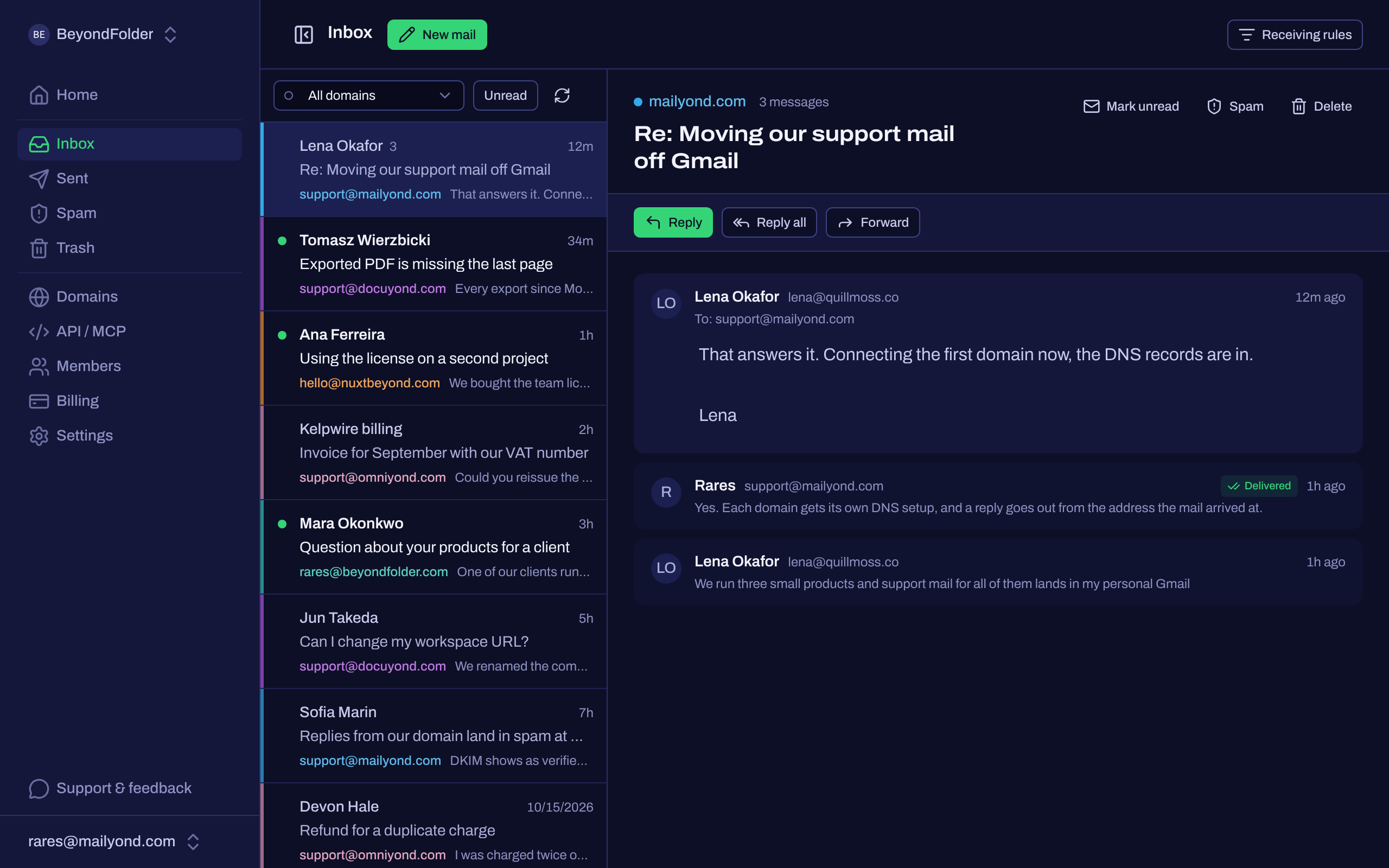
Every address on every domain you own, arriving in the same inbox.
Every domain, one inbox
Mail for all your domains lands in a single inbox, color tagged so you know which project it came from.
Reply as the right brand
Your answer goes out from the address the customer wrote to, in the same thread. Reply all and forward work the way you expect.
Same domains, one API
Send transactional mail from your app with one POST. No second vendor, no second DNS setup.
Your main inbox doesn't have to move
you@yourdomain.com stays exactly where it is. Point support.yourdomain.com at Mailyond and nothing about your current setup changes.
How it works
- 1
Add three DNS records
DKIM, Return-Path and MX. Paste them in, hit verify, about 5 minutes.
- 2
Mail starts arriving
Anything sent to any address on that domain shows up in your inbox.
- 3
Reply, or send from code
Answer in the dashboard, or POST to the API with your workspace key.
Send from your app with one POST
No SDK to learn, no config file. One API key covers every domain in the workspace.
Already on Resend? You can keep it and use Mailyond for the inbox. If you'd rather have sends and replies on one bill, point the Resend SDK at https://mailyond.com/api/external, swap in your myond_ key, and resend.emails.send() keeps working.
fetch("https://mailyond.com/api/external/emails", {
  method: "POST",
  headers: { "Authorization": "Bearer myond_..." },
  body: JSON.stringify({
    to: "user@example.com",
    from: "support@yourdomain.com",
    subject: "Welcome",
    html: "<h1>Hello!</h1>"
  })
})
Read and answer replies from Claude or Grok Bot
Mailyond runs an MCP server, so your agent reads the inbox across every domain you have connected and replies in the right thread. Same API key you already use for sending.
claude mcp add --transport http \
  mailyond https://mailyond.com/mcp \
  --header "Authorization: Bearer myond_..."
Setup Mailyond mcp server from https://mailyond.com/mcp using API key myond_...
- list_conversations
- What came in, across every domain or just one of them. Sent and spam on request.
- get_conversation
- The whole thread as plain text.
- reply_to_conversation
- Answers in-thread, from the address the mail arrived at.
- send_email
- A new message from any connected domain.
- list_domains
- Which domains that key can read and send on.
There is nothing to install. Cursor, Windsurf and VS Code take the same URL and header in their own mcp.json, and the same key works over plain HTTP if you would rather write the calls yourself.
Pricing
Basic
$10/month
- Up to 5 domains
- Unlimited addresses on every domain
- 5,000 emails / month
- $1.80 / 1,000 extra emails
- 1 member
Five domains in one inbox, sending and receiving, on one bill and one DNS setup each. That is $2 a domain.
Start free trialPro
$20/month
- Up to 10 domains
- Unlimited addresses on every domain
- 10,000 emails / month
- $1.50 / 1,000 extra emails
- Up to 3 workspace members
Ten domains in one inbox, with room for two more people. For founders with more products than the Basic plan holds.
Start free trialAgency
$40/month
- Up to 30 domains
- Unlimited addresses on every domain
- 25,000 emails / month
- $1.30 / 1,000 extra emails
- Up to 10 workspace members
Thirty domains under one login, at a flat rate instead of a separate mailbox bill for each one.
Get startedEvery plan: Resend-compatible send API, inbox API and MCP server, domain-locked API keys, spam filter with sender rules.
Need more?
Tell us how many domains and how much volume, and we'll put a plan together.
Before you connect anything
Start with one domain. A subdomain is enough to try it.
Try it free for 7 days.